Yofanka: A Handwritten Font for Creative Web Design
As a web designer, finding the right font can make or break the visual appeal and functionality of your projects. Yofanka, a stylish handwritten font, strikes the perfect balance between elegance and readability, making it an excellent choice for enhancing the beauty of your digital creations.
Visual Characteristics and Personality of Yofanka
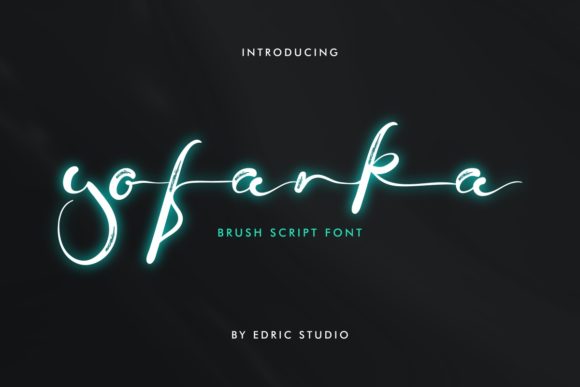
Yofanka is a modern, balanced, and varied script font. Its not-too-thin, not-too-thick strokes create a visually appealing and harmonious look. The natural flow and slight variations in each letter add a touch of personality, making it stand out in any design. This font is particularly well-suited for creative and brand-focused web experiences.
Using Yofanka in Website Headers and Hero Sections
One of the best applications of Yofanka is in website headers and hero sections. Its elegant and inviting style can instantly capture the attention of visitors, setting the tone for the entire site. For example, a creative portfolio or a boutique online store can use Yofanka to create a welcoming and professional first impression.
Enhancing Readability and Visual Hierarchy
While Yofanka is a decorative font, it maintains a high level of readability, especially when used in larger sizes. In hero titles and section headings, Yofanka can help establish a clear visual hierarchy, guiding users through the content and highlighting key messages. For body text, consider pairing Yofanka with a clean sans serif font to ensure optimal readability.
Yofanka in Call-to-Action Areas and Buttons
Yofanka's unique style makes it a great choice for call-to-action (CTA) areas and buttons. Its distinctive appearance can draw the eye and encourage interaction. However, be mindful of using it in smaller sizes or on small buttons, as it may become less legible. For these cases, a simpler, more legible font might be a better fit.
Creating Engaging Online Shop Banners and Blog Graphics
Online shop banners and blog graphics can benefit greatly from Yofanka's charm. Use it for short, impactful phrases or to add a personal touch to your promotional materials. For instance, a coaching website or a product landing page can leverage Yofanka to create a more engaging and relatable user experience.
Font Pairing and Design Consistency
To maintain a consistent and professional look, pair Yofanka with complementary fonts. A classic combination is using a decorative display font like Yofanka for headings and a simple sans serif font for body text. This approach ensures that the overall design is both visually appealing and easy to read. For a more editorial feel, you might consider pairing Yofanka with a serif font.
Practical Tips for Mobile and Responsive Design
When designing for mobile and responsive layouts, it's crucial to test Yofanka's readability on various screen sizes. Ensure that the font size and line spacing are adjusted appropriately to maintain clarity. For dark backgrounds, consider using a slightly lighter weight of Yofanka to enhance visibility. Similarly, for light backgrounds, a darker weight can provide better contrast.
Commercial Licensing and Usage
Before using Yofanka in client projects, online stores, or digital templates, make sure to check the commercial licensing terms. Most premium fonts, including Yofanka, come with specific usage rights, and it's important to comply with these to avoid any legal issues. Additionally, verify the availability of different styles, file formats, and multilingual support to ensure the font meets all your project requirements.
Conclusion
In summary, Yofanka is a versatile and visually appealing handwritten font that can significantly enhance the aesthetic and functionality of your web designs. Whether you're working on a creative portfolio, an e-commerce site, or a digital brand kit, Yofanka offers the perfect blend of style and readability to make your projects stand out. By carefully considering its application and pairing it with complementary fonts, you can create a cohesive and engaging online presence.